
The shift toward cloud computing has reshaped the way Australian businesses operate. From small startups to major enterprises, organisations are moving their legacy systems to the cloud to increase agility, reduce operational costs, and stay competitive in an increasingly digital economy. But modernising decades-old software is no small task. It requires strategic planning, expert execution, and a clear vision for long-term growth.
In this blog, we explore why cloud application development in Australia is booming, the challenges businesses face with legacy systems, and how to successfully modernise these systems for reliability, performance, and scalability.
Why Modernising Legacy Systems Is No Longer Optional
Legacy systems—outdated software and infrastructure still used for critical operations—often hold businesses back. Many Australian companies rely on old ERP systems, on-premise CRMs, or custom-built applications that are not compatible with modern digital tools.
Here’s why updating these systems has become essential:
1. Rising Operational Costs
Legacy systems demand ongoing maintenance, specialised support staff, and expensive hardware replacements. Cloud-based solutions dramatically reduce these costs.
2. Limited Scalability
Older systems struggle to handle increasing data, user loads, or integrations. Cloud apps scale effortlessly as your business grows.
3. Security Risks
Unsupported software exposes businesses to cyber threats. Cloud platforms offer advanced, continuously updated security features.
4. Lack of Integration Capabilities
Modern workflows rely on APIs, automation tools, CRM/ERP integration, and third-party services—features legacy systems simply can’t support.
5. Remote Work Requirements
Australian businesses now expect hybrid and remote work flexibility. Cloud applications make access easy from anywhere.
Benefits of Cloud Application Development for Australian Businesses
Transitioning to cloud-based applications unlocks multiple advantages, including:
✔ Cost Efficiency
No need for physical servers, IT maintenance costs, or hardware updates.
✔ Faster Deployment & Innovation
Cloud platforms enable continuous updates, faster development, and improved feature releases.
✔ Better Data Accessibility
Teams can instantly access information from any location—ideal for Australia’s distributed workforces.
✔ Robust Security & Compliance
Top providers—AWS, Azure, Google Cloud—offer world-class data encryption, identity management, and compliance with Australian regulations.
✔ Enhanced Performance
Cloud systems improve load times, reduce downtime, and ensure high application reliability.
Challenges in Legacy Modernisation — and How to Overcome Them
Modernising legacy systems is beneficial, but not without challenges. Understanding these obstacles helps businesses avoid common pitfalls.
1. Data Migration Complexity
Legacy data may be unstructured or duplicated.
Solution: Use automated data migration tools and perform validation checks before final deployment.
2. Downtime Concerns
Businesses fear interruptions while transitioning.
Solution: Adopt a phased migration approach with parallel run times.
3. Compatibility Issues
Older applications don’t integrate easily with new technologies.
Solution: Use middleware, APIs, or microservices architecture to rebuild components gradually.
4. Resistance from Teams
Employees comfortable with old systems may hesitate to change.
Solution: Provide training and involve teams early in the transition roadmap.
5. Security & Compliance Requirements
Healthcare, finance, and government sectors require strict controls.
Solution: Implement cloud solutions that support regional compliance (ISO, ACSC Essential Eight, APRA, etc.).
Top Cloud Modernisation Approaches Used in Australia
Australian businesses typically choose between these modernisation strategies:
1. Rehosting (Lift-and-Shift)
Move applications to the cloud with minimum changes.
Best for: Businesses needing quick migration without redevelopment.
2. Replatforming
Modify parts of the application to work better in the cloud.
Best for: Companies wanting moderate improvements with reasonable costs.
3. Refactoring / Re-architecting
Rebuild applications to use cloud-native features like microservices and serverless computing.
Best for: Organisations looking for long-term scalability and innovation.
4. Replacing Legacy Systems
Switch to SaaS or develop an entirely new cloud application.
Best for: Severely outdated or unsupported legacy software.
How to Successfully Modernise Legacy Systems — Step by Step
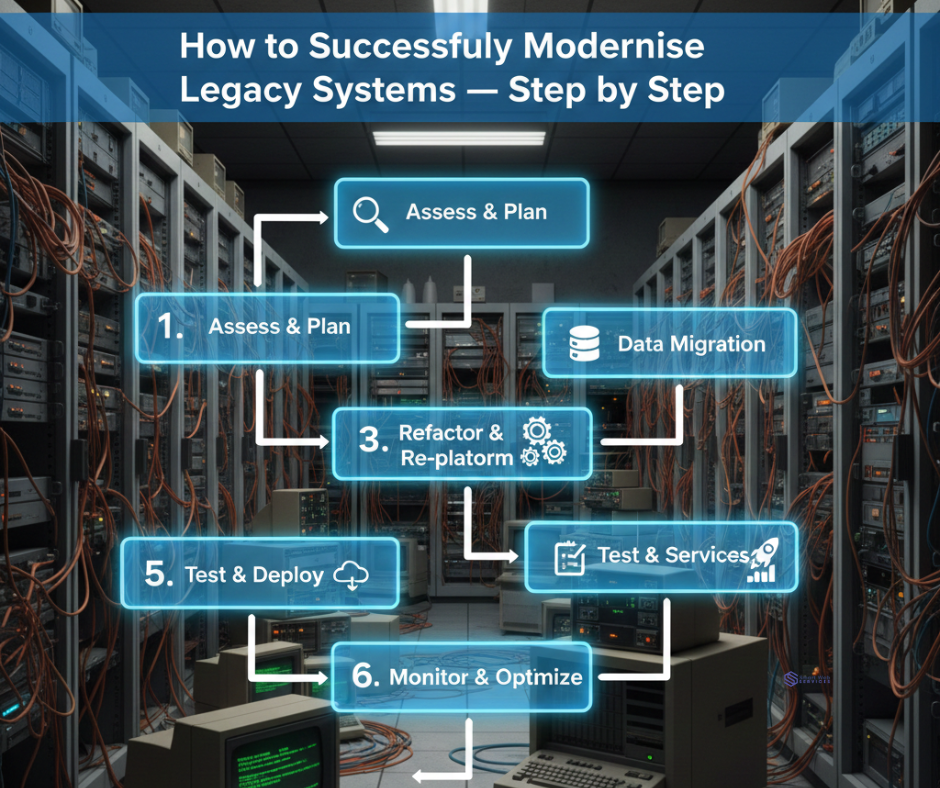
To ensure a smooth cloud transformation, follow this structured roadmap:
Step 1: Assess Your Legacy System
Identify performance bottlenecks, vulnerabilities, technical debt, and integration challenges.
Key questions:
- What is outdated?
- Can parts be upgraded instead of replaced?
- What are the business goals?
Step 2: Choose the Right Cloud Platform
Options include:
✔ AWS
✔ Microsoft Azure
✔ Google Cloud
✔ Local Australian cloud providers
Consider pricing, global coverage, compliance, support, and integration options.
Step 3: Develop a Cloud Strategy
Your strategy should include:
- Modernisation approach (rehost, replatform, refactor, or replace)
- Timelines
- Budget
- Infrastructure requirements
- Risk management plan
Step 4: Migrate Data Securely
Use migration tools such as AWS Database Migration Service or Azure Migrate to transfer large datasets with minimal downtime.
Step 5: Rebuild and Optimise the Application
Adopt modern cloud development practices:
- Microservices
- Containerisation (Docker, Kubernetes)
- API-driven architecture
- Serverless functions (AWS Lambda, Azure Functions)
Step 6: Test for Performance & Security
Run tests for:
✔ Load capacity
✔ API functionality
✔ Vulnerability scanning
✔ User experience
Step 7: Train Your Teams
Ensure employees understand how to use the new system efficiently. Provide documentation and hands-on training sessions.
Step 8: Launch & Monitor
Once deployed, use monitoring tools to track performance:
- AWS CloudWatch
- Azure Monitor
- Google Cloud Operations Suite
Real Examples of Legacy System Modernisation in Australia
Australian businesses from various industries are transforming with cloud-enabled solutions:
Retail
Stores are integrating inventory management, sales analytics, and CRM into cloud apps for real-time visibility.
Healthcare
Clinics are moving patient management systems to the cloud for better accessibility and compliance.
Logistics
Transport companies now use cloud-based tracking and automation to speed up delivery processes.
Finance & Insurance
Cloud systems help institutions maintain compliance while improving security and operational efficiency.
These success stories show that cloud modernisation is not just a trend—it’s a game-changer.
Conclusion: The Future of Australian Businesses Is Cloud-Built
Modernising legacy systems through cloud application development is no longer optional—it’s a strategic requirement for long-term growth. Australian businesses that embrace cloud technologies gain:
✔ Higher performance
✔ Better security
✔ Cost savings
✔ Faster innovation
✔ Stronger scalability
Whether you’re upgrading partially or rebuilding completely, cloud transformation sets the foundation for future-proof digital success.